Status Indication on Airport Conveyor
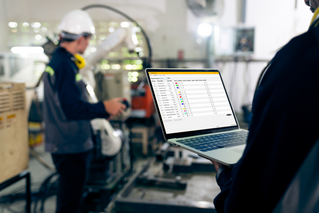
A manager in charge of installing a baggage handling conveyor sought a light to indicate start, jam, and reset conditions with different colors and animations.
Add clarity to every process with combinations of color, interactive control, and audible tones that make process cues and status unmistakable.
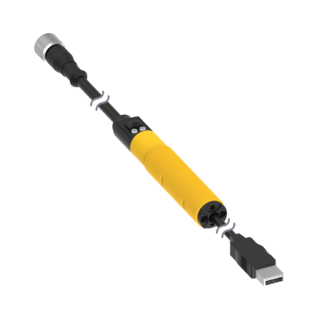
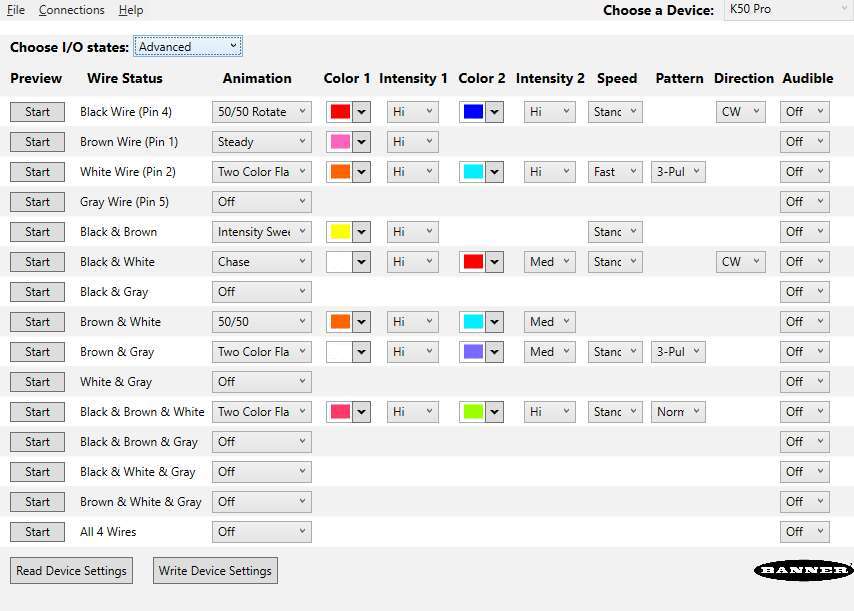
Standard models provide reliable status indication right out of the box, while programmable models extend functionality with configurable response and support for real-time control over IO-Link or Modbus. Color, LED animation, and more can be configured using Banner’s free Pro Editor software or controlled dynamically via protocol. For high-density Modbus systems, models with PICK-IQ, Banner’s high-speed serial protocol, deliver faster visual feedback. For specialized application requirements, models are available for hazardous areas, hygienic environments, outdoor daylight visibility, and localized I/O control.
Whether using discrete signals or protocol-based control, process states become intuitive feedback that guides action, reduces response time, and confirms progress in real time. Where tasks could move faster, awareness could sharpen, or response time could improve—there is a K50 that can make it happen.
K50 Indicators, Touch Buttons, and Touchless Buttons
Standard and programmable K50 Indicators cover everything from basic status indication to complex visual signaling across a wide range of applications. Model variants include beacon, audible, and daylight-visible, ensuring unmistakable indication indoors and out, while IP66/IP67/IP69K ratings support long-term performance in demanding conditions.
Standard models offer immediate deployment with up to five fixed colors and are available in compact, domed, and flat pack housings, as well as specialty housings for hazardous zones and hygienic environments.
Programmable models provide configurable RGB LED response and support for real-time control over IO-Link or Modbus. 14 colors and 11 animations can be configured using Banner’s free Pro Editor software or controlled dynamically via protocol.
K50 Touch Buttons combine advanced touch technology with unmistakable status indication that translates process signals into clear, interactive feedback. Available in domed or compact housings, all models streamline panel design by replacing multiple conventional buttons with a single device that supports latching or momentary functions and can be operated without pressure—reducing strain and improving ergonomics.
Standard models are ready out of the box with up to three fixed colors, selectable based on input priority. All models are IP66/IP67/IP69K-rated for reliable performance in demanding environments.
Programmable models extend functionality with configurable touch response, multiple I/O modes, and support for real-time control over IO-Link or Modbus. Color, animation, and on/off delays can be configured using free Pro Editor software or controlled dynamically via protocol.
Variants include models with audible output, integrated displays, and FDA-grade housings for hygienic environments.
K50 Touchless Buttons deliver reliable, no-contact activation with unmistakable status indication—ideal for reducing touchpoints in high-cycle applications. Configurable optical sensing from 20 to 1000 millimeters ensures responsive operation tailored to the task. 14 color options, 11 animations, and on/off delays—all configurable using free Pro Editor software or controlled dynamically via IO-Link or Modbus—provide visual feedback that makes any process more intuitive. Support for Banner’s PICK-IQ protocol enables real-time feedback and faster updates in dense systems.
Lightweight construction provides a cost-efficient solution while maintaining IP66/IP67/IP69K-rated protection for harsh industrial environments. With no moving parts and built-in immunity to ambient light, EMI, and RFI, K50 Touchless Buttons ensure long-lasting, zero-contact control in demanding applications.
K50 Programmable models provide expanded flexibility and expressive range to communicate status or operating conditions with greater specificity and relevance to each application. Configurable using Banner’s free Pro Editor software or controlled in real time via IO-Link or Modbus, expanded color options, LED animations, and audible tones increase the signaling vocabulary to reflect distinct machine states, guide operator response, or confirm process progress.
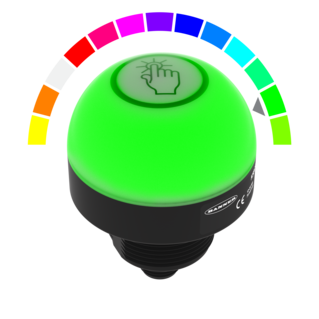
LED color is programmable based on machine state, input condition, or system event—providing tailored signaling for each application. Devices offer seven preset colors without configuration, while Pro Editor, IO-Link, or Modbus provide access to up to 14 predefined colors, each of which can be assigned to represent a distinct status, making it easy to adapt signaling behavior with less hardware.
Programmable animations use motion to highlight change, direct attention, or clarify status—helping operators respond faster and more accurately. K50 devices support a wide range of animation types, including flashing, rotating, intensity sweeping, and segment-based effects like chase or fill. These patterns can be tied to machine states, timers, or operator input, helping signal progress or draw attention where it's needed most.
Visual and audible intensity can be set independently to match ambient conditions or application demands. LED brightness can be set to low, medium, or high to optimize visibility without distraction. Sound intensity can likewise be adjusted for clarity in quiet or noisy environments. Intensity settings apply globally or per state and may be toggled through input, IO-Link, or Modbus, depending on the model. All adjustments are made in software with no physical changes required.
K50 Programmable devices with audible capability offer a range of tone types including pulse, strobe, siren, whoop, wobble, continuous tones, and selectable melodies. Each tone is distinct in pattern and character, making it possible to associate specific sounds with particular events, priorities, or response types. Tones can be mapped to states in software and triggered by input or logic conditions, with optional control over playback mode and duration. Configuration is managed through Pro Editor software or controlled dynamically via IO-Link or Modbus.
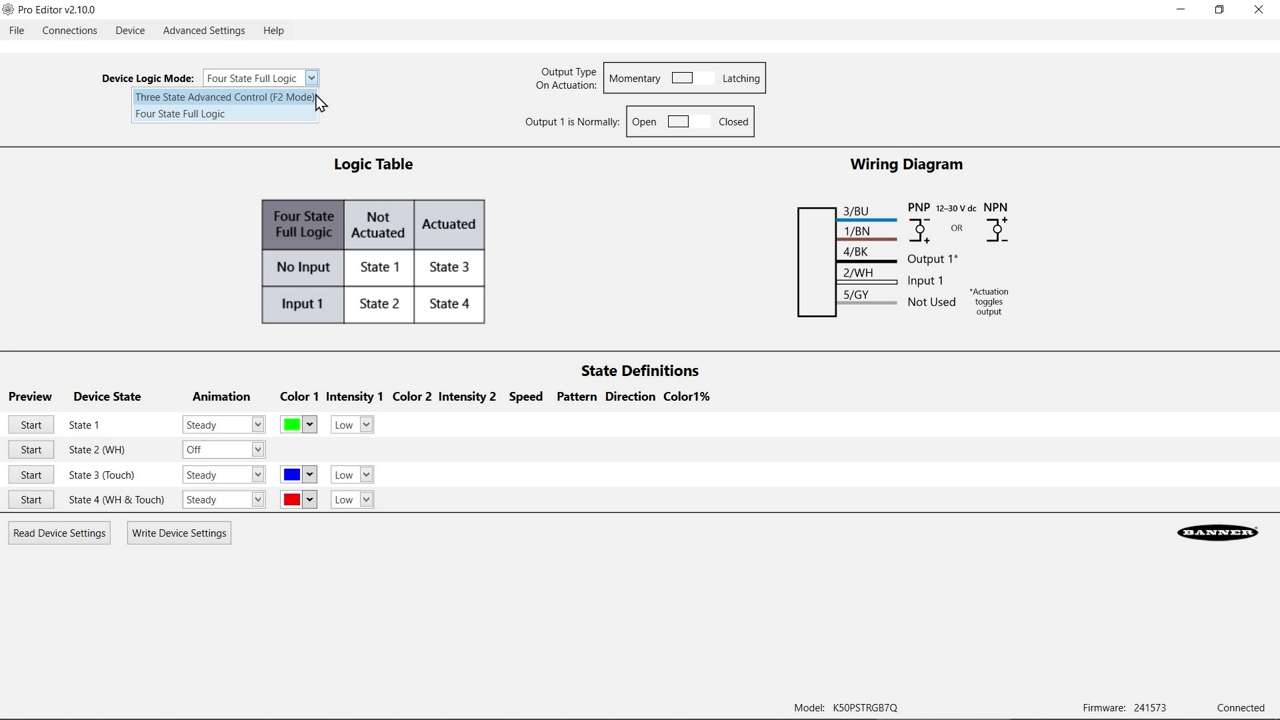
K50 Programmable devices can be configured to respond to inputs in different ways, controlling both the device's appearance and the output signals it uses to control other equipment. Output behavior can be customized to match the role of the device within the system—whether signaling, acknowledging events, or driving downstream actions. Configurable modes include momentary or latching outputs, normally open or normally closed states, and adjustable on/off delays. Models with analog or PWM/PFM outputs can reflect system values or respond dynamically to logic or touch. Logic and control settings are configurable using Banner’s free Pro Editor software or controlled dynamically via IO-Link or Modbus. Options range from basic on/off control to four-state logic, where each state defines a unique combination of output behavior and appearance.
K50 Hazardous Area models are certified for use in applications that require compliance with global hazardous location classifications, including both Zone- and Division-based systems. Built for deployment where clarity and consistency are critical, these models provide up to three state-variable colors in a sealed, impact-resistant housing rated IP67/IP69K. Certified protection methods include intrinsic safety, non-sparking design, and sealed construction to prevent ignition of flammable gases or dust.
FDA models are constructed with compliant materials and laser-marked labeling to withstand frequent high-pressure washdowns without risk of label degradation or false triggering. A fully sealed housing rated IP67/IP68/IP69K resists ingress from spray, foam, and oils—ensuring reliable signaling and interaction through repeated cleaning cycles. Available as indicators or touch buttons, these models support clear communication and consistent performance in demanding, hygienic production applications.
A manager in charge of installing a baggage handling conveyor sought a light to indicate start, jam, and reset conditions with different colors and animations.
Il a besoin d'une solution capable d'accélérer les temps de réponse du cariste en installant des voyants d'indication sur le tableau de bord du chariot élévateur et qui permet au cariste de confirmer la réception de la demande, afin d'éliminer des livraisons redondantes par plusieurs caristes.
Vehicle detection at loading docks is complicated because sensing solutions are exposed to the elements and need to recognize a wide variety of surfaces. Rugged ultrasonic sensors work well to accurately detect the surfaces of delivery vehicles regardless of the material. Pairing with bright LED indication creates unmistakable operator guidance.
Les boutons tactiles K50 Pro avec communication IO-Link affichent le « takt time » dans le champ de vision des travailleurs afin de maintenir la cadence d'assemblage et de respecter les objectifs de production.
Les laboratoires cliniques doivent traiter rapidement les échantillons pour maintenir la productivité et tout retard dans les procédures de test risque de perturber le workflow. Les voyants à LED, comme le K50L2, font office de systèmes d'indication d'état des machines afin que le laborantin puisse corriger les erreurs, traiter les échantillons et collecter les résultats dans les délais prescrits.
La fabrication du pain demande créativité, précision et souci du détail. La société Wilkinson Baking Company a ajouté l'innovation technique à la recette. La boulangerie Wilkinson Bread Bakery est une ligne de fabrication du pain compacte, complètement autonome et automatisée. Cette machine unique marie parfaitement technologie et tradition pour transformer de simples ingrédients en pains frais au rythme de 40 pains par heure.
Le dôme d'indication K50L de 50 mm est idéal pour signaler l'état de fonctionnement des navettes autonomes. Celles-ci se déplacent sur de courtes distances dans des environnements extérieurs qui exposent la technologie du bus à diverses conditions climatiques. Les robustes voyants K50L ont un indice de protection IP67 ou IP69K qui garantit leur étanchéité à l'eau dans un environnement difficile.
A Henshaw customer manufactures drivetrain and powertrain systems for the automotive industry. The company had experienced productivity losses due to errors in the assembly of transmission valve bodies. Henshaw was tasked with developing a system that would reduce errors and improve the assembly process.
A leading machine manufacturer builds workstations designed for accurate, timely and cost-effective battery cell assembly. A value added component of the workstations is an operator guidance device that does three jobs: enables assembly processes to start and stop, indicates parts to be picked and installed, and completely stops line operation if emergencies occur. When it became too costly for the OEM to construct and mount these devices themselves, they turned to Banner to craft an all-inclusive solution. To honor the time line requirements of their customer—a major tier two battery supplier—the OEM needed the solution in eight weeks.
Au fur et à mesure du passage des composants dans le four, il devient de plus en plus difficile de suivre la cadence de déchargement des pièces. Celles-ci s'accumulent dans la zone de tri. Elles peuvent être facilement endommagées ou mal acheminées. Une interruption du flux des pièces permet à l'opérateur de déchargement de corriger les erreurs ou de désencombrer un poste de prélèvement. Toutefois, la distance entre les zones de chargement et de déchargement ainsi que les interférences des machines environnantes compliquent la communication entre les opérateurs.
Chaque opérateur d'une ligne de production a été équipé d'un nœud sans fil et d'un voyant d'indication EZ-LIGHT K50. Un autre nœud et un voyant d'indication EZ-LIGHT sont installés sur chaque chariot élévateur. Lorsqu'un opérateur de la production a besoin de pièces, il appuie sur le bouton de l'EZ-LIGHT, dont le voyant vert devient rouge. En même temps, les voyants du cariste passent de vert à rouge pour lui signaler qu'un opérateur a besoin de pièces.
Les voyants d'indication EZ-LIGHT visibles à la lumière du jour procurent un éclairage intense avec 18 LED qui peuvent être activées ensemble ou en trois groupes de six pour contrôler l'intensité lumineuse. Ils représentent une solution idéale pour les applications nécessitant une communication bien visible en extérieur. Un pare-soleil proposé en option améliore leur visibilité et en fait des solutions efficaces même avec des niveaux élevés d'ensoleillement.
Solutions de détection de bouteilles translucides remplies de liquide transparent le long d'une chaîne d'embouteillage comportant de nombreuses zones à surveiller.
Lorsqu'une fenêtre est située directement derrière une armoire, un voyant à LED extrêmement lumineux et durable offre un système d'indication très visible pendant toute la journée. Le K50 EZ-LIGHT de Banner est parfaitement adaptée à de nombreuses applications d'indication, surtout dans les armoires car la il est très visible même pendant la journée grâce à des LED durables et écoénergétiques.
La signalisation visuelle permet de communiquer efficacement un état pour assurer le bon fonctionnement des équipements et augmenter la productivité. Les balises sont fortement lumineuses et très visibles à la lumière du jour. Elles permettent à l'opérateur de connaître, depuis la cabine, l'état des verrous tournants de l'épandeur pour garantir un levage en toute sécurité. Robustes et durables, les balises offrent un signal lumineux très intense, de sorte qu'elles conviennent parfaitement aux applications de signalisation en extérieur.
A Banner wireless solution is a simple way to optimize inventory, reduce errors, and minimize waste. Each SureCross Performance Node with I/O Mapping can be equipped with up to six EZ-LIGHT operator indicator lights. The SureCross Gateway is conveniently located at a central location where maintenance personnel and management can monitor the parts consumption throughout the site.
Dans le cadre du processus d'exécution de commandes d'un distributeur de confiserie, des casiers sont équipés de capteurs EZ-LIGHT K50 connectés à un contrôleur de processus programmé en fonction de la commande. Le K50 s'illumine pour indiquer les articles à prélever pour chaque commande. Dès que le travailleur place sa main dans le casier, l'indicateur détecte la présence de la main et le contrôleur déclenche le K50 sur le casier suivant dans lequel une pièce doit être prélevée.
Des capteurs d'aide au choix EZ-LIGHT K50 avec bouton poussoir sont installés sur un rack contenant des pièces. Les voyants signalent les pièces à prélever. Une fois la pièce prélevée, le travailleur enfonce le bouton situé sur le voyant pour confirmer le prélèvement.
Several technologies and solutions are available for bin-picking applications for error-proofing processes. Light arrays prompt the operator for part selection with integral job lights, then reliably sense retrieval of the part, using an array of visible red or infrared sensing beams located in front of the bin.
Banner’s K50 Optical Pick-to-Light series is a compact, self-contained, three color indicator with integral sensor. Green typically indicates which part to pick, and when the internal sensor detects the hand, the indicator changes to yellow to confirm the task is complete. An optional third message is to display red for a mispick.
Banner’s K50 Series of single-point pick-to-light sensors are a simple, easy-to-use error-proofing solution in assembly applications. In this application, the job light is Green while the job input is active, indicating the correct bin for the next pick. The presence of the assembler’s hand initiates an output change of state, turning the job light red. The job light above the next pick location will then turn Green.
Le capteur EZ-LIGHT K50 en mode rétroréflectif indique que la pièce suivante dans la séquence d'assemblage est le toit ouvrant. Lorsque l'opérateur choisit le toit ouvrant dans le grand casier, le K50 détecte le prélèvement.
The EZ-LIGHT K50 sensor lights above a bin to show the assembler which part to pick. If the assembler reaches into a different bin, that bin's EZ-LIGHT K50 sensor lights up in the designated warning color—in this example, red— to indicate the error.
Afin d'identifier et d'utiliser correctement la gestion visuelle, un capteur se déclenche lorsque le sac est rempli et envoie un signal au bouton tactile K50 qui devient rouge, signifiant que le sac est plein. Le bouton tactile K50 signale par une indication visuelle que le sac doit être retiré et remplacé par un sac vide. Pour indiquer que le sac est prêt à recevoir de nouvelles boîtes, l'opérateur appuie sur le bouton tactile ergonomique K50 afin qu'il redevienne vert.
Dispositif complet, le bouton d'arrêt d'urgence combiné au voyant tactile K50 communique un signal d'état simple dans des situations d'urgence. Le bouton d'arrêt d'urgence avec base de montage de 30 mm de Banner possède une base éclairée qui passe du jaune au rouge clignotant lorsqu'il est actionné, signalant une situation d'arrêt d'urgence très visible. Le voyant tactile K50 est un produit optimisé doté d'une conception ergonomique qui fonctionne sans pression physique et peut être déclenché à mains nues ou avec des gants de travail.
Le capteur K50 à suppression d'arrière-plan fixe de Banner détecte les mains gantées et détermine si l'opérateur sélectionne les pièces correctes au cours du processus de kitting, ou mise en kits. La fonction logique du K50 peut ensuite indiquer à l'opérateur qu'il a prélevé les pièces correctes en faisant passer l'indicateur de vert à jaune. Il est possible de sélectionner des couleurs supplémentaires selon les préférences du fabricant. Comme les opérateurs portent généralement des gants de couleur foncée dans les processus de lean manufacturing, il est tout particulièrement important que le K50 soit capable de détecter les gants noirs.
Banner propose une solution d'appel de pièces efficace qui associe le système sans fil PM8, des boutons lumineux K50 et une colonne lumineuse TL50 multi-segments avec alarme sonore (qui combine des voyants LED de grande qualité et plusieurs couleurs au sein d'un même dispositif). Dans un premier temps, des boutons tactiles ergonomiques K50 de Banner sont installés dans un poste de supervision et numérotés conformément aux nœuds sans fil PML8 correspondants, installés sur chaque poste de travail aux côtés d'une colonne lumineuse avec alarme sonore.
The unique indication of the programmable K50 Pro touch buttons and Pro Editor software allows for versatile indication of numerous machine statuses and in-field customization. Multicolor and animation allow for quick identification of errors in work cells.
Des nœuds FlexPower son déployés sur chaque cuve au sein d'un réseau sans fil SureCross, de sorte qu'aucun câblage n'est requis pour l'alimentation électrique ou la transmission des données d'E/S. La fonctionnalité de gestion énergétique unique développée par Banner permet à un nœud équipé d'un détecteur à ultrasons à sortie analogique de fonctionner pendant des années avec une seule batterie DX81. Chaque nœud FlexPower DX80 combine des E/S logiques et analogiques, ce qui rend inutile toute collecte de données manuelle et souvent fastidieuse.
L'application avertit les opérateurs de l'état d'échec du poste de contrôle pondéral sur une chaîne de transformation alimentaire dans un environnement de lavage haute pression difficile.
A system of Banner’s TL70 wireless modular tower lights and K50 touch buttons provides an efficient, easy way to communicate a call for more parts with a forklift driver. When a workstation is almost out of cartons, the operator touches the ergonomic K50 touch button which changes the status on the connected TL70 wireless tower light to red.
Une imprimerie spécialisée dans les travaux d'impression sur carton ne parvenait pas à suivre le rendement et les performances de ses opérateurs en fonction des normes de rendement.
Lorsque les pièces commencent à manquer, l'assembleur appuie sur le bouton poussoir EZ-LIGHT K50 à gauche qui sert de bouton d'appel pour signaler au coursier d'apporter des pièces. Le voyant K50 à droite sert de voyant de prise de pièces.
Avant la mise en place d'un témoin lumineux EZ-LIGHT K50L, l'opérateur devait poser une pièce sur la machine, puis s'éloigner de son poste de travail pour vérifier auprès d'une colonne lumineuse que la pièce avait été chargée correctement. Dans le cas contraire, l'opérateur devait répéter ces opérations avant de mettre la machine en marche. Depuis l'installation du K50L au niveau du poste de travail (à l'aide d'un répartiteur en Y), l'opérateur sait immédiatement si la pièce est positionnée correctement.
Solution de détection avec indication lumineuse dans un car-wash pour signaler les étapes du cycle de lavage.
We noticed you didn’t finish your online checkout. We're dedicated to providing the best shopping experience possible and would love to hear if you faced any challenges. Let us know how we can make your experience even better.
Regardez cette vidéo pour découvrir les caractéristiques et avantages du bouton tactile programmable K50.
Regardez cette vidéo pour découvrir les caractéristiques et avantages du bouton sans contact programmable K50.
Regardez cette vidéo pour découvrir les caractéristiques et avantages du voyant d’indication programmable K50.
Watch this video to learn about the K50 Pro Select Touch Button 3-State Mode.
Watch this video to learn about the K50 Pro Select Optical Touch Button 4-State Detection Mode.
Watch this video to learn how to use the Pulse Control feature of the K50 Pro Select Indicators.
Watch this brief how-to video to see how Banner’s Pro ID feature and Pro Editor software quickly and easily copy configurations to Pro Select lighting products.
This video covers the basics of programing the audible alarm available in select models of the K50 Pro Touch Button from Banner Engineering.
This video covers the basics of the 4-state mode for the K50 Pro Touch Buttons from Banner Engineering.
This video covers the basics of the 3-state mode for the K50 Pro Touch Button from Banner Engineering.
The Pro Series programmable multicolor LED devices from Banner Engineering offer limitless possibilities for advanced indication of dynamic machine states, operator interaction, and process statuses. Watch the video to see what elevates a Banner Pro light above a traditional factory light.
Banner Engineering offers a complete portfolio of touch buttons for your simplest to most advanced touch requirements. Watch the video to learn more about our capabilities for touch and indication.
Indicator lights are the visual language of machines. However, traditional indicators are limited. Watch the video the see how programmable RGB indication clarifies communication, simplifies your supply chain, and allows you to quickly create custom indication to match your process.
Même dans des environnements difficiles, les boutons tactiles Gen 2 de Banner Engineering réagissent toujours parfaitement au toucher. Le boîtier en polycarbonate résiste aux produits chimiques et le bouton ne s'active pas en cas d'exposition directe aux jets.
La deuxième génération des voyants d'indication K50 et K30 de Banner Engineering vous offre plus d'options pour bénéficier d'un système d'indication lumineux et très visible, allié à un câblage et une gestion des pièces simplifiés. Choisissez parmi sept couleurs avec un seul modèle robuste.
Learn how to use the Pro Editor to configure K50 Pro Touch buttons.
This video covers the basics of setting up a K50 Pro Series Indicator from Banner Engineering.
Banner Engineering propose de nombreuses solutions pour l'industrie minière, y compris des solutions destinées à l'extraction, au traitement et au transport. Optimisez votre exploitation avec les solutions Banner.
Les adaptateurs de tuyaux redessinés de Banner offrent une solution de support solide, robuste et facile à mettre en œuvre pour nos tours lumineuses TL50 et voyants K50 qui ne compromettent pas l'attrait esthétique de ces produits.
Our application engineers are here to help with expert guidance and support. Send us your inquiry, and we’ll get back to you as soon as possible. We’re here to make sure you get the answers you need.