
-
Products
-
Lighting and Indication
-
Tower Lights
-
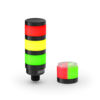
TL70 Pro Select Tower Light
70 MM TOWER LIGHT
Banner’s TL70 Pro Select Tower Light combines modular 70 millimeter construction with configurable MULTICOLOR indication, animations, and audible alerts that make machine conditions easily recognizable at a glance. IO-Link® communication and software-based configuration help machine builders standardize indication across equipment, adapt configurations as application needs change, and access real-time diagnostics for more efficient maintenance and troubleshooting.
- Modular tower light architecture adapts to changing application requirements, helping machine builders standardize designs and simplify future modifications
- Up to five configurable light segments and one audible segment combine indication for multiple machine conditions in a single device, reducing hardware and installation complexity
- Programmable multicolor LED segments create customized indication schemes that make machine conditions, process steps, and operator prompts easier to recognize at a glance
- Bright multicolor illumination provides clear status indication in changing ambient light, and appear gray when off to reduce false readings of inactive segments
- IO-Link communication and software-based configuration allow users to remotely configure colors, animations, audible alerts, and segment behavior, making it easier to standardize indication and update machines without hardware changes
- Advanced animations, dynamic light effects, and audible alerts communicate machine conditions with greater detail, helping operators identify issues faster and respond sooner
- Automatic module detection recognizes number and type of modules, streamlining setup, reducing configuration effort, and simplifying future modifications
Incomplete Checkout
Share Your Checkout Experience
We noticed you didn’t finish your online checkout. We're dedicated to providing the best shopping experience possible and would love to hear if you faced any challenges. Let us know how we can make your experience even better.
Product Selection
How-to: Advanced Table Functionality
Arrange column order by dragging and dropping the column header left/right with your mouse.
Sort items in a column by ascending values by clicking the table header once. Click a second time to sort by descending order. Click a third time to remove the sorting for that column.
Shift-click additional column headers to sort by multiple attributes. The first column you sort becomes the primary sort, and each Shift-clicked column adds a secondary level of sorting.
-
Reset
Have a Technical Question?
Our application engineers are here to help with expert guidance and support. Send us your inquiry, and we’ll get back to you as soon as possible. We’re here to make sure you get the answers you need.