All Applications
Banner Engineering delivers smart, cost-effective solutions that satisfy customer requirements, perform at the highest levels, and reliably solve challenges.
Sure Cross® MultiHop Ethernet Data Radios are wireless industrial communication devices used to create point-to-multipoint configurations of wireless Ethernet networks.
Ethernet Data Radios
Banner Engineering delivers smart, cost-effective solutions that satisfy customer requirements, perform at the highest levels, and reliably solve challenges.
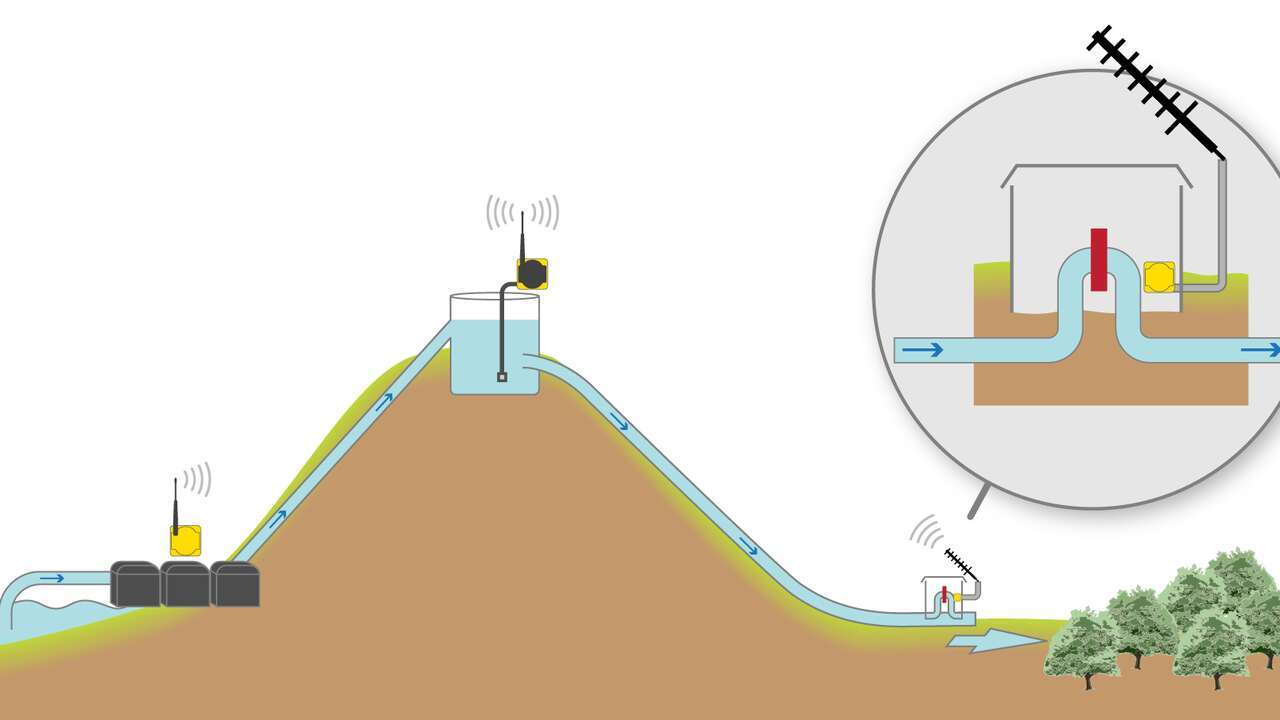
The Gateway, or wireless network controller, monitors the water level inside the water tank. When the water level drops, a Node installed with the reservoir pumps uses its outputs to cycle the pumps on or off. A series of Nodes monitors the amount of water flowing into each orchard. A 1 Watt Data Radio connected to the Gateway transmits the data to a mobile asset or a centralized control center for data processing and billing.
We noticed you didn’t finish your online checkout. We're dedicated to providing the best shopping experience possible and would love to hear if you faced any challenges. Let us know how we can make your experience even better.
The R70ER and DX700ER Ethernet Data Radios function as transparent Ethernet cable replacements by creating a wireless link that transmits standard Ethernet traffic between connected devices without requiring changes to device configuration.
Any Ethernet-based data can be transmitted, provided total network traffic remains within the radio’s throughput limits.
The connected devices (PLC, HMI, PC, etc.) treat the wireless link exactly like a wired Ethernet connection.
The R70ER and DX700ER are designed for:
Supported network topologies are:
Important: Broadcast-based star and tree topologies may introduce occasional packet loss. Control systems must be capable of re-requesting data (e.g., Modbus works well).
For best performance:
Radio data transfer rates are:
Actual usable throughput depends on:
Point-to-point networks provide the highest throughput and lowest latency.
| Feature | Configuration Method | Ethernet Connection | Antenna | Environmental Rating | Operating Temperature | Supply Voltage | Data Rate |
|---|---|---|---|---|---|---|---|
| R70ER | DIP switches | D-Code M12 | Internal | IP65 | –40 °C to +85 °C | 10–30 V DC | 300 kbps (900 MHz) / 250 kbps (2.4 GHz) |
| DX700ER | LCD menu interface | RJ45 | External (RP-SMA) | IP10 | –20 °C to +60 °C | 12–30 V DC | 300 kbps (900 MHz) / 250 kbps (2.4 GHz) |
R70ER advantages are:
DX700ER advantages are:
General Network Requirements
R70ER Setup
R70ER configuration is performed using:
DX700ER Setup
1. Apply 12–30 V DC power
2. Use LCD menu:
3. Bind radios:
4. Perform Site Survey:
The DX700ER also supports:
Yes. A managed Ethernet switch is strongly recommended.
The radios forward all Ethernet traffic by default. Excessive broadcast or multicast traffic can overload the wireless link and cause network failure.
To prevent overload:
No. The radios operate as transparent Ethernet bridges and are not controlled via PLC programs or industrial Ethernet protocols.
Site surveys cannot be performed over standard TCP/IP from a PLC or PC.
Line of sight is not strictly required, but signal strength and achievable range improve significantly when there is an unobstructed path between radios.
Always perform a site survey before permanent installation to verify signal quality at the intended mounting locations.
Our application engineers are here to help with expert guidance and support. Send us your inquiry, and we’ll get back to you as soon as possible. We’re here to make sure you get the answers you need.